
In this article, we will cover:
Standardized data file format specifications help ensure your sales transaction data is clean and ready for accurate analysis. TrueLoyal requests the past 2-4 years of sales transaction data to perform this analysis. The data file you send must follow a specific format, which this article describes in detail.
Click here for a sample data file in CSV format. Use this format to prepare a clean data file to send to TrueLoyal.
Fields Included in the Data File
The data file provided to TrueLoyal must contain the following data fields. The column names in the CSV data file must be EXACTLY as specified below. Any change will cause the analysis to fail. The data file must have, at a minimum, the 3 mandatory fields listed below. Any row that does not have the mandatory fields populated correctly will be skipped during analysis.
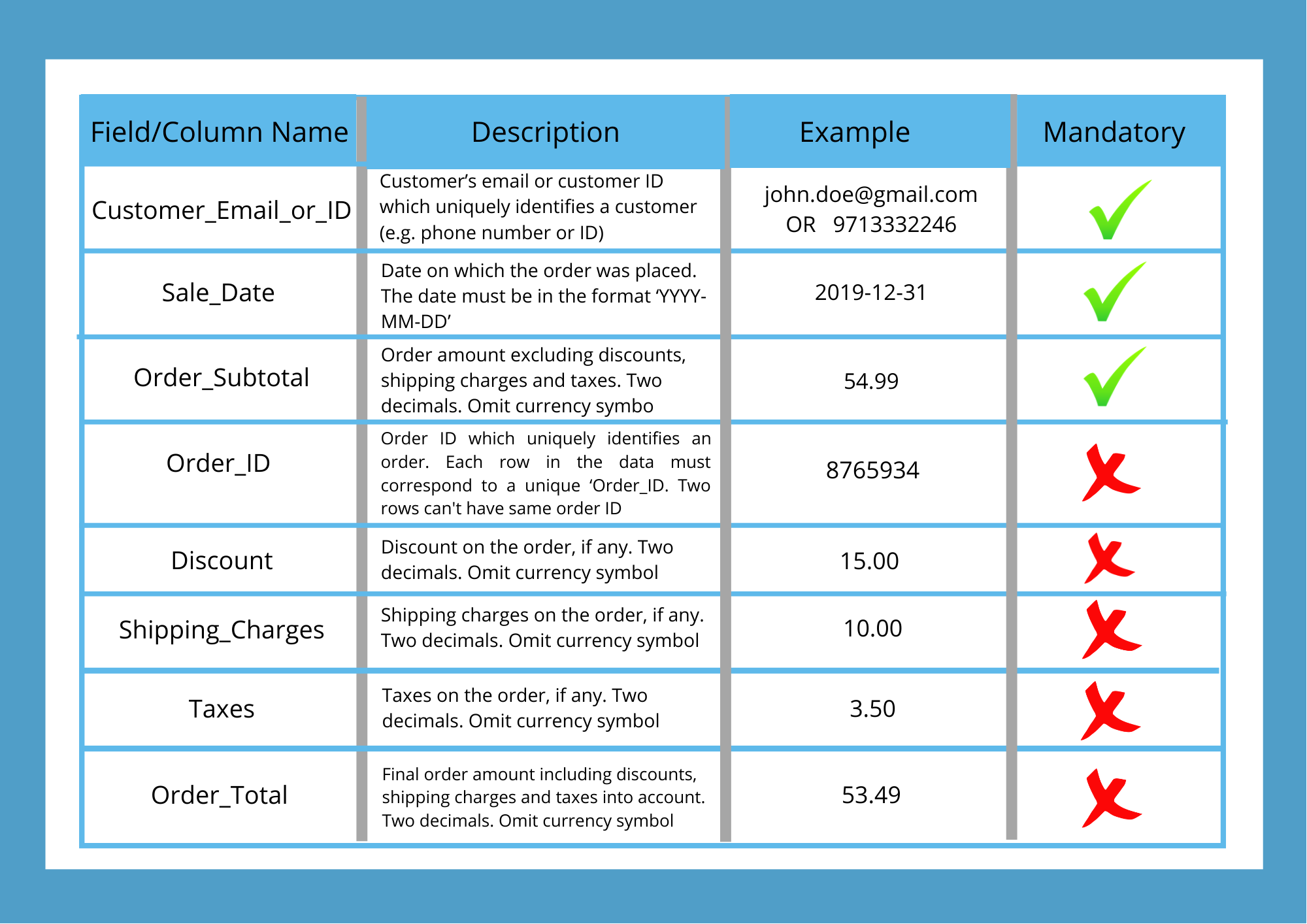
To prepare a data file to send to TrueLoyal, start by downloading the sample CSV file.
Once TrueLoyal receives the data file, our data science team will process it, run it through our algorithms, and provide you with a Customer Journey Report and Current Business KPIs.
Additional Information about Data Fields
Read this section only if you need to know more about each data field or have additional questions.
Customer_Email_or_ID (Mandatory Field)
- Must be a valid email address, like
john.doe@gmail.com, or a numeric ID, like9713332246 - If it is a numeric ID, it should contain ONLY digits
- No blanks. If this field has blanks, that row will be ignored/skipped from the analysis
- No numbers in exponential notation, e.g.
9.7E+8
Sale_Date (Mandatory Field)
- This is the date on which the order was placed
- Format
YYYY-MM-DD, for example2019-12-31for Dec 31, 2019 - No blanks. If this field has blanks, that row will be ignored/skipped from the analysis
Order_Subtotal (Mandatory Field)
- Two decimal places. For example,
54.99 - No currency character. The value should NOT appear as
$54.99, but as54.99 - All values must be in the same currency
- No negative values, like
-26.37 - No zero values like
0.00 - No blanks. If this field has blanks, that row will be ignored/skipped from the analysis
Order_ID (Optional)
- Must be a numeric ID, like
8765934 - No values in exponential format (e.g.
8.7E+6); use the full number, like8765934
Discount (Optional)
- Two decimal places. For example,
15.00 - No currency character. The value should NOT appear as
$15.00, but as15.00 - No negative values
- Zero or blank value means zero discount
Shipping_Charges (Optional)
- Two decimal places, e.g.
10.00 - No currency character. The value should NOT appear as
$10.00, but as10.00 - No negative values
- Zero or blank value means zero shipping charges
Taxes (Optional)
- Two decimal places, e.g.
3.50 - No currency character. The value should NOT appear as
$3.50, but as3.50 - No negative values
- Zero or blank value means zero taxes
Order_Total (Optional)
- Formula:
Order_Total = Order_Subtotal - Discount + Shipping_Charges + Taxes - Two decimal places. For example,
53.49 - No currency character. The value should NOT appear as
$53.49, but as53.49
Click here for a sample data file in CSV format. Use this format to prepare a clean data file to send to TrueLoyal.
Note: The CSV file name should not contain any special characters.
If you have any questions or concerns regarding the data file format, please don't hesitate to contact Technical Support at support@trueloyal.com.
Comments
Please sign in to leave a comment.