
Set up the purchase tracking server side API to award points for purchases.
Introduction
The fundamental function of a loyalty rewards program is to drive additional purchases. Therefore purchase tracking is a very important part of the API.
The Purchase Tracking API passes the data for each purchase to TrueLoyal. This enables TrueLoyal to award points for purchases. This API is typically called from the server side after the checkout process is complete. The API call can be triggered when the order is created, shipped or completed depending on the business requirements.
Purchase API
The API call is a HTTP POST request to this end point URL.
POST https://help.trueloyal.com/reference/award-pointsClick here for detailed documentation.
API Authentication
All API calls have to be authenticated with your API key and partner ID. The API key and partner ID are automatically generated for you when your TrueLoyal account is created. These can be found in your TrueLoyal admin console under the General >> Settings section.
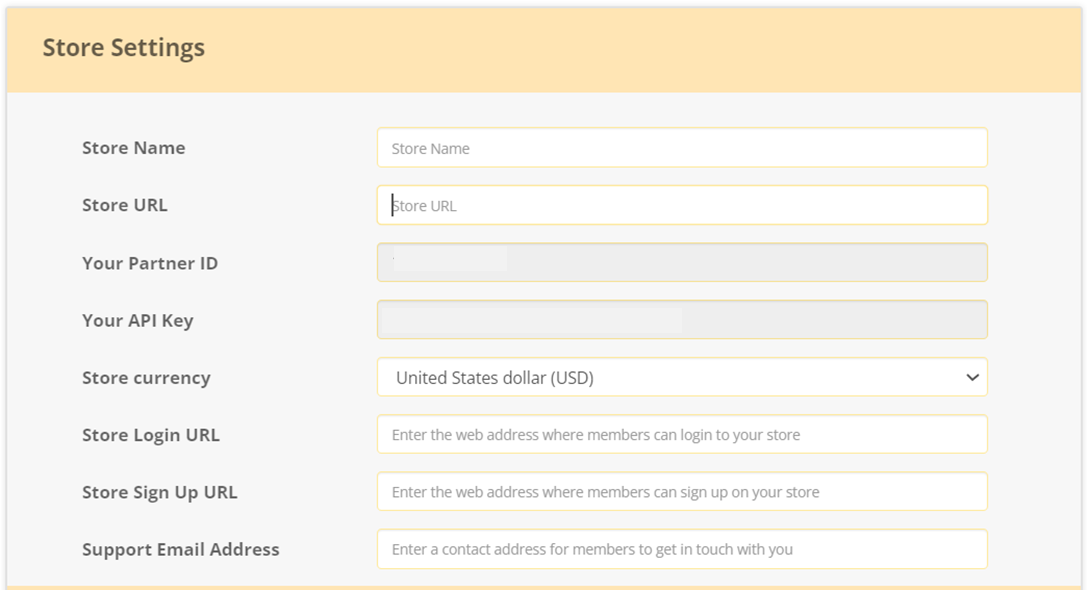
For authenticating an API call, you have to send your Partner ID, and an API Key in the HTTP header of each API request.
Send the keys in the HTTP header of each API request as given below:
'api-key': '<your-api-key'
'partner-id' : '<your-partner-id>'
Calling the Purchase API
Here is a sample Python script to call TrueLoyal's Purchase API when the user checkout process is complete and the order has been registered. Note that if there are multiple products, then they need to be populated in the products[ ] object.
import requests
import json

headers = {'partner-id': 'cad458dc4e',
           'api-key': 'c921e097e6679d21c0cad26a45bfec20'}
products = [{"category": "Medicines",
            "img_url": "https://cdn.website.com/product1/img.jpg",
            "price": "26.95",
            "product_id": "1234df",
            "quantity": "1",
            "tags": "medicines,capsules",
            "title": "Stress Free Emotions",
            "url": "http://www.website.com/product1.html"}]

payload = {"user_email": "johndoe@gmail.com",
       "total=32.17",
       "subtotal=26.95",
       "order_id=75a2726d13artibb10",
       "currency=USD",
       "coupon_code=CODE101",
       "products"=json.dumps(products)}

response = requests.post(url = "https://api.zinrelo.com/v1/loyalty/purchase",
                        headers = headers, data = payload)
📘
Please Note: The order subtotal should be calculated as the sum of the subtotals of all products in the order, without taking into account any discounts. The discounted price needs to be adjusted in products and passed accordingly.
For more information, please refer to the Award API help document.
Here is a description of the various product parameters used to create the products[ ] object in the code snippet above. There will be one entry for each product item in this order.
| Parameter | Type | Mandatory | Description |
|---|---|---|---|
| member_id | string | Yes | Unique Identifier (Member ID) for the member object in the client’s system which was used while creating a member in Zinrelo. |
| activity_id | string | Yes | Unique ID that identifies an activity in Zinrelo. This is the activity against which the transaction has to be recorded. |
| approval_date | string | No | Date and time on which the transaction will be auto approved. |
| transaction_attributes | json | Yes | Every activity has two predefined transaction attributes - reason and tags. While creating a transaction, data can be passed in these attributes. Custom attributes: In addition to the predefined attributes, you can create custom attributes for an activity and pass data in those attributes when the transaction is created. The purchase activity is a special case where there are additional predefined transaction attributes and some of them are mandatory, such as- product_id, price, quantity, product title and url. |
JSON Response
Here is the sample JSON structured response that you will receive from TrueLoyal.
{
  "data": {
          "user_email": "johndoe@gmail.com",
          "last_name": "John",
          "first_name": "Doe",
          "activity_id": "made_a_purchase",
          "activity_name": "Made a Purchase",
          "transaction_type":"award",
          "points": 270,
          "points_status": "auto_approved",
          "created_time": "30-Mar-16 19:20:22"
  },
  "success":true
}
Expected Result
TrueLoyal will respond with standard HTTP success or failure codes. In case of a success response, the points will reflect in the user's account in the TrueLoyal Admin Console.
Error Handling
For failures, TrueLoyal will also include extra information about what went wrong, encoded in the response as JSON. The various HTTP and API status codes TrueLoyal might return are listed below.
Standard HTTP status codes:
| Code | Title | Description |
|---|---|---|
| 200 | Ok | The request was successful. |
| 400 | Bad Request | Bad request. |
| 401 | Unauthorized | Your API key is invalid. |
| 404 | Not Found | The resource does not exist. |
| 500 | Internal Server Error | An error occurred with our API. |
| 503 | Service Unavailable | Service Unavailable. |
TrueLoyal API Status Codes:
| Status Code | Error Code | Message |
|---|---|---|
| 200 | UNABLE_TO_UPLOAD_PHOTO | Unable to upload the photo. Please try again later. |
| 400 | ATTRIBUTE_NOT_UNIQUE | IdParams name passed is not a unique attribute. |
| 200 | MEMBER_ID_ALREADY_IN_USE | Member ID already in use. |
| 200 | INVALID_MEMBER_STATUS | Invalid member status. |
| 200 | MEMBER_BLOCKED | Member has been blocked. |
| 200 | MAX_AWARDS_EXCEEDED | Maximum award limit exceeded. |
| 200 | INVALID_AMOUNT_TO_DEDUCT | Not enough points to deduct. |
| 400 | INVALID_JSON | Invalid JSON format. |
| 400 | INVALID_REQUEST | Invalid request: unsupported Content-Type [content-type]. |
| 200 | INCORRECT_MEMBER_ID_PASSED | Incorrect Member ID passed. |
| 200 | STORE_INACTIVE | Store is not active. |
| 200 | MEMBER_DELETED | Member record has been deleted. |
| 200 | EXCLUDED_TRANSACTION | Points could not be awarded because exclusion rule was applied. |
| 404 | TRANSACTION_DOES_NOT_EXIST | Transaction does not exist. |
| 500 | INTERNAL_SERVER_ERROR | Internal server error. |
| 400 | INVALID_REQUEST_PARAMETER_VALUES | Invalid request parameter value. |
| 200 | INVALID_PHOTO | Invalid file type or file size. Please make sure uploaded file type is JPG, JPEG, or PNG. and file size should be less than 10MB. |
| 200 | PAUSED_ACTIVITY | Activity is in paused state. |
| 400 | ID_PARAM_NAME_NOT_FOUND | IdParams name passed does not exist. |
| 401 | ERROR_UNAUTHORIZED | Some error occurred while authenticating your account at Zinrelo. Please verify your API credentials. |
| 200 | DUPLICATE_ORDER_ID | Loyalty Points already awarded for the Order ID. |
| 200 | MEMBER_CREATION_UNSUCCESSFUL | Member creation unsuccessful. |
| 400 | MERCHANT_DOES_NOT_EXIST | Merchant does not exist. |
| 200 | TRANSACTION_ATTRIBUTE_NOT_UNIQUE | Unique transaction attribute for given activity is not unique. |
| 200 | INVALID_MEMBER | Member does not exist. |
| 400 | INVALID_CURSOR | Invalid start cursor provided |
| 503 | SERVICE_UNAVAILABLE | API Service is unavailable. Please contact Zinrelo support. |
| 200 | INACTIVE_REWARD | This reward is inactive and cannot be redeemed. |
| 200 | AUTO_REDEEMABLE_REWARD | Cannot redeem auto redeemable reward via API. |
| 200 | INVALID_REWARD_FOR_USER | Returned product quantity exceeds order quantity. |
| 200 | MAX_REWARDS_EXCEEDED | Maximum redemption threshold for reward reached. |
| 200 | INSUFFICIENT_REDEEMABLE_POINTS | User points balance insufficient. |
| 200 | INVALID_REWARD_FOR_TIER | This reward is not valid for user tier. |
| 200 | ORDER_NOT_EXIST | Order with this id does not exist. |
| 200 | PRODUCT_QUANTITY_EXCEEDED | Returned product quantity exceeds order quantity. |
| 200 | INVALID_PRODUCT_ID | Incorrect product id passed. |
| 200 | RETURN_VALUE_EXCEEDS_AVAILABLE_BALANCE | Returned order value exceeds user's points balance. |
| 200 | PRODUCT_ID_AND_RETURN_AMOUNT_PASSED | Please pass either returned product id or returned amount. |
Comments
Please sign in to leave a comment.