
In this article, we will cover:
- Overview
- Find your Partner ID
- Manage API keys
- Allow your domain in CORS settings
- Admin API
- User Interface (UI) API
- Guest API
- Rate limits
- Status codes and error codes
- Frequently asked questions
Overview
The Loyalty API is a RESTful API that allows you to interact with your loyalty program's data and features. It is built on HTTP, and requests and responses are formatted in JSON.
The Loyalty API provides a variety of endpoints that allow you to do things like:
- Create, retrieve, update and delete loyalty members
- Award, redeem, deduct, return and reverse points
- Approve, reject or modify pending transactions
- List activities, rewards and tiers, including the ones a member is eligible for
- And much more
There are three APIs, and each one authenticates differently:
- Admin API: You send your Partner ID and an API key in the HTTP header of each request.
- User Interface (UI) API: Designed for the front end. You authenticate with a JSON Web Token (JWT) paired with your Partner ID, and responses include more limited data than the Admin API.
- Guest API: Designed for the front end. You authenticate with your Partner ID only, and it only fetches basic program details.
For complete documentation on our API, including every endpoint and its parameters, please reference our developer docs, found here.
Note: The developer docs cover the newest version of the Loyalty API. If you are still using the older version (V1), please see the V1 documentation.
This article covers what you need to set up in the admin console before you make your first call (your Partner ID, API keys and CORS settings), along with rate limits and status codes.
Find your Partner ID
All three APIs use your Partner ID. To find it, log in to the admin console and go to General > Settings. Your Partner ID is shown under Store Settings.

Manage API keys
TrueLoyal APIs handle sensitive data, so any call made to the TrueLoyal API is authenticated with your account's API keys. You need an API key for the Admin API, and an API key plus its API key identifier to generate a JWT for the UI API.
Note:
- The API Keys section is only visible to admins with full access.
- All actions are logged in the audit trail.
- Each program can have a maximum of 20 API keys.
Generate an API key
To generate an API key for your TrueLoyal store:
- Go to General > API Keys and click Create API Key.
- Enter a name and description, then click Create API Key.
The new key appears in the list.
Repeat these steps for each integration. We recommend a separate API key for each integration.
Find your API key and API key identifier
Go to General > API Keys. From the list of API keys and identifiers, select the one you created for calling TrueLoyal endpoints.
API key actions
You can manage each key in the list with the following actions:
-
Show/Hide: Click the eye icon to unmask the API key. After successful authentication, the API key is shown. Click the eye icon again to mask it.
-
Copy: Use this icon to copy the API key.
-
Edit Key Details: You can edit the name and description of the API key.
-
Deactivate Key: Disables the API key. While a key is disabled, APIs using it will show an authentication error. You can enable a disabled key again.
-
Activate Key: Enables a disabled API key.
-
Delete Key: Hard deletes the API key. This action only appears when the key is disabled. When you select it, a confirmation message appears, and you need to confirm it to proceed.
Allow your domain in CORS settings
Before you can use the UI API or the Guest API, you need to grant access to the origin by adding its URL to the CORS settings in the admin console:
- Go to General > Settings.
- Find CORS Settings.
- Add the origin URL. You can add multiple domains by separating them with commas, without any spaces.
- Save your changes.
Admin API
To authenticate an Admin API call, send your Partner ID and an API key in the HTTP header of each request, as shown below:
'api-key': '<your-api-key>'
'partner-id' : '<your-partner-id>'
User Interface (UI) API
The UI API is designed to be used on the front end, and you can use it to build your own UI elements such as the loyalty dashboard. Because the responses are available in the front end, they include more limited data than the Admin API.
To authenticate with the UI API, you generate a JSON Web Token (JWT) and pass it along with your Partner ID. To generate the JWT, you need an API key and its API key identifier.
Before you start, make sure your domain is allowed in the CORS settings.
Generate a JWT token
You can generate a JWT token using the Python snippet below:
import jwt

secret = 'your-api-key'
user_info = {
    'sub': 'api-key-identifier',
    # REQUIRED: Pass API key identifier.
    'member_id': 'unique-id',
    # REQUIRED: Pass member's unique identifier in this field when the user is logged in.
    'exp': 1635862400,
    # REQUIRED: Epoch timestamp (seconds), after which the token will expire
}

encoded_jwt = jwt.encode(user_info, secret, algorithm='HS256')
print(encoded_jwt)
Note: If you are using the default API key for the JWT token, there is no need to pass the 'sub' parameter.
Pass the JWT and Partner ID in the API
Once you have the JWT and your Partner ID, include them when making API requests.
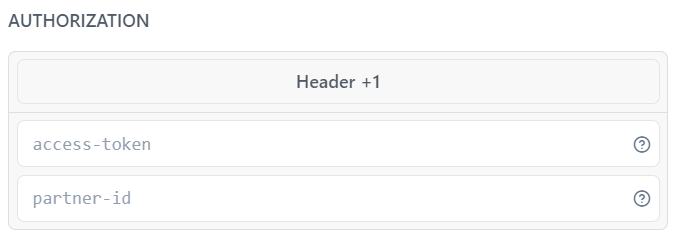
The UI API uses the same status codes and error codes as the Admin API.
Guest API
The Guest API is also designed to be used on the front end, and you can use it to build your own UI elements such as the loyalty dashboard. Unlike the UI API, the Guest API only fetches basic program details.
To authenticate with the Guest API, you just need to pass your Partner ID. Before you start, make sure your domain is allowed in the CORS settings.
Pass the Partner ID in the API
Once you have your Partner ID, include it when making API requests.
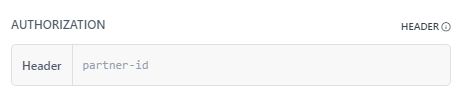
The Guest API uses the same status codes and error codes as the Admin API.
Rate limits
TrueLoyal APIs are subject to rate limits to safeguard against spikes in traffic and ensure system stability. Some API endpoints need stricter limits than others, so all endpoints are grouped into categories and each category has its own limit:
- 50 Write API requests per minute
- 50 Member Eligibility API requests per minute
- 100 General API requests per minute
If you exceed these limits, the server returns the "429 Too Many Requests" HTTP status code with the response body below. If you receive this error, retry the API call using an exponential backoff retry strategy.
Example response:
{
    "reason": "Rate limit exceeded",
    "error_code": "RATE_LIMIT_EXCEEDED",
    "success": false
}
Note:
- These rate limits apply to the standard plan. To check the rate limits for your current plan, please write to your account manager at support@trueloyal.com.
- If you anticipate a surge in API requests due to a promotion or special campaign, please let your account manager know in advance so we can ensure smooth operation during high-traffic periods.
Write APIs
- Create a Loyalty Member API
- Update a Loyalty Member with Member ID
- Update a Loyalty Member with TrueLoyal Generated ID
- Award Points
- Redeem Points
- Deduct Points
- Return Points
- Approve a Pending Award/Redeem Transaction using ID
- Approve a Pending Award/Redeem Transaction using Unique Transaction Attribute
- Reject a Pending Award/Redeem Transaction using ID
- Reject a Pending Award/Redeem Transaction using Unique Transaction Attribute
- Modify a pending Award Transaction with Transaction ID
- Modify a pending Award Transaction using Unique Transaction Attribute
- Reverse Points with Transaction ID
- Reverse Points using Unique Transaction Attribute
Member Eligibility APIs
- List all the Eligible Activities for a Member using TrueLoyal Generated Member ID
- List all the Eligible Activities for a Member using Member ID
- Get Eligible Rewards with Member ID
- Get Eligible Rewards with TrueLoyal Generated Member ID
General APIs
- Retrieve a Loyalty Member with Member ID
- Retrieve a Loyalty Member with TrueLoyal Generated ID
- List Members
- Delete a Loyalty Member with Member ID
- Delete a Loyalty Member with TrueLoyal Generated ID
- List all activities
- Retrieve an Activity using Activity ID
- Retrieve an Activity using TrueLoyal Generated ID
- Retrieve Custom Attribute for an Activity using Activity ID
- Retrieve Custom Attribute for an Activity using TrueLoyal Generated ID
- List All Rewards
- Retrieve a Transaction with Transaction ID
- Retrieve a Transaction using Unique Transaction Attribute
- List all Transactions
- List all Transactions with Member ID
- List all Transactions with TrueLoyal Generated Member ID
- List all Tiers API
Status codes and error codes
These status codes and error codes apply to the Admin API, the UI API and the Guest API, with two differences:
- The 429 RATE_LIMIT_EXCEEDED error is only returned by the Admin API.
- In the Guest API, the 401 ERROR_UNAUTHORIZED and 503 SERVICE_UNAVAILABLE messages use the legacy brand name "Zinrelo" instead of "TrueLoyal".
Status Codes
This is the high-level status code returned with each response:
| Code | Title | Description |
|---|---|---|
| 200 | Ok | The request was successful. |
| 400 | Bad Request | Bad request. |
| 401 | Unauthorized | Your API key is invalid. |
| 404 | Not Found | The resource does not exist. |
| 500 | Internal Server Error | An error occurred with our API. |
| 503 | Service Unavailable | Service Unavailable. |
Error Codes
These are the error codes you may receive:
| Status Code | Error Code | Message |
|---|---|---|
| 200 | UNABLE_TO_UPLOAD_PHOTO | Unable to upload the photo. Please try again later. |
| 400 | ATTRIBUTE_NOT_UNIQUE | IdParams name passed is not a unique attribute. |
| 200 | MEMBER_ID_ALREADY_IN_USE | Member ID already in use. |
| 200 | INVALID_MEMBER_STATUS | Invalid member status. |
| 200 | MEMBER_BLOCKED | Member has been blocked. |
| 200 | MAX_AWARDS_EXCEEDED | Maximum award limit exceeded. |
| 200 | INVALID_AMOUNT_TO_DEDUCT | Not enough points to deduct. |
| 400 | INVALID_JSON | Invalid JSON format. |
| 400 | INVALID_REQUEST | Invalid request: unsupported Content-Type [content-type]. |
| 200 | INCORRECT_MEMBER_ID_PASSED | Incorrect Member ID passed. |
| 200 | STORE_INACTIVE | Store is not active. |
| 200 | MEMBER_DELETED | Member record has been deleted. |
| 200 | EXCLUDED_TRANSACTION | Points could not be awarded because exclusion rule was applied. |
| 404 | TRANSACTION_DOES_NOT_EXIST | Transaction does not exist. |
| 500 | INTERNAL_SERVER_ERROR | Internal server error. |
| 400 | INVALID_REQUEST_PARAMETER_VALUES | Invalid request parameter value. |
| 200 | INVALID_PHOTO | Invalid file type or file size. Please make sure uploaded file type is JPG, JPEG, or PNG. and file size should be less than 10MB. |
| 200 | PAUSED_ACTIVITY | Activity is in paused state. |
| 400 | ID_PARAM_NAME_NOT_FOUND | IdParams name passed does not exist. |
| 401 | ERROR_UNAUTHORIZED | Some error occurred while authenticating your account at TrueLoyal. Please verify your API credentials. |
| 200 | DUPLICATE_ORDER_ID | Loyalty Points already awarded for the Order ID. |
| 200 | MEMBER_CREATION_UNSUCCESSFUL | Member creation unsuccessful. |
| 400 | MERCHANT_DOES_NOT_EXIST | Merchant does not exist. |
| 200 | TRANSACTION_ATTRIBUTE_NOT_UNIQUE | Unique transaction attribute for given activity is not unique. |
| 200 | INVALID_MEMBER | Member does not exist. |
| 400 | INVALID_CURSOR | Invalid start cursor provided |
| 503 | SERVICE_UNAVAILABLE | API Service is unavailable. Please contact TrueLoyal support. |
| 200 | INACTIVE_REWARD | This reward is inactive and cannot be redeemed. |
| 200 | AUTO_REDEEMABLE_REWARD | Cannot redeem auto redeemable reward via API. |
| 200 | INVALID_REWARD_FOR_USER | This reward is not valid for the user. |
| 200 | MAX_REWARDS_EXCEEDED | Maximum redemption threshold for reward reached. |
| 200 | INSUFFICIENT_REDEEMABLE_POINTS | User points balance insufficient. |
| 200 | INVALID_REWARD_FOR_TIER | This reward is not valid for user tier. |
| 200 | ORDER_NOT_EXIST | Order with this id does not exist. |
| 200 | PRODUCT_QUANTITY_EXCEEDED | Returned product quantity exceeds order quantity. |
| 200 | INVALID_PRODUCT_ID | Incorrect product id passed. |
| 200 | RETURN_VALUE_EXCEEDS_AVAILABLE_BALANCE | Returned order value exceeds user's points balance. |
| 200 | PRODUCT_ID_AND_RETURN_AMOUNT_PASSED | Please pass either returned product id or returned amount. |
| 429 | RATE_LIMIT_EXCEEDED | Rate limit exceeded. |
Frequently asked questions
How will this impact my old integration with the default API keys?
This will not impact your old integration at all. However, if you want to update the API key for your old integration, you need to generate a new API key and replace the default one.
If you plan to use a new API key in the UI APIs or the Authentication JS, the JWT tokens will be created with the new API key. In that case, you also need to send the API key identifier so that TrueLoyal can recognise that the tokens were generated with a new API key.
If you have any questions or concerns regarding the Loyalty API, please don't hesitate to contact Technical Support at support@trueloyal.com.
Comments
Please sign in to leave a comment.